MyStory.today version 1.27 delivers enhanced precision for your writing with improved font size control, better text protection, and more reliable synchronization across devices.
🎯 Precise Font Size Control: Set Your Perfect Reading Experience
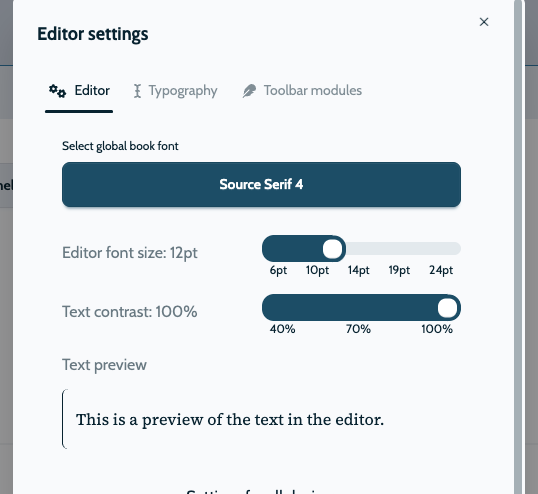
Writers have unique preferences for text appearance on screen. Version 1.27 replaces the previous limited font size options with precise point-based control, giving you complete customization of your editor’s appearance.
Why Point-Based Font Size Matters
The previous small/medium/large options limited many writers. Now you have complete control:
How It Works
The new font size system works simply and effectively:
- Point-Based Scale: Set font size from 8pt to 72pt using a simple slider
- Real-Time Preview: See text change as you adjust the size
- Persistent Settings: Your preference is saved and restored across sessions

🛡️ Improved Text Protection: Smarter Deletion Confirmation
Accidentally losing text is frustrating. Version 1.27 enhances the text deletion confirmation system to be more intelligent and less intrusive.
Better Detection Logic
We’ve completely rethought when deletion warnings should appear:
Smarter Confirmation Dialog
The confirmation dialog now appears only when you truly need it:
- Empty Scene Detection: Only warns when saving a scene that has become completely empty
- Significant Deletion: Triggers only when substantial text is being removed
- Clear Options: Simple “Save Empty” and “Cancel” choices with clear consequences
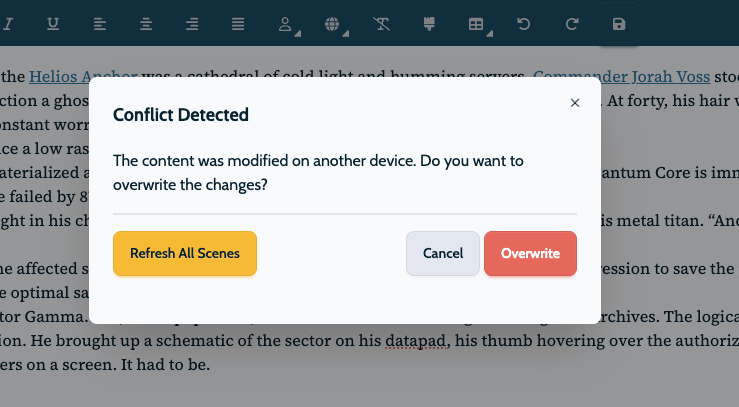
Working across multiple devices is essential for writers. Version 1.27 introduces advanced synchronization to prevent accidentally overwriting newer content with older versions.
Conflict Resolution System
The new sync system handles conflicting changes intelligently:
- Update Tracking: Every scene now tracks when it was last modified
- Server Comparison: Checks if the server version is newer than your changes
- Clear Warnings: Provides detailed information when conflicts are detected
How to Resolve Sync Conflicts
If you try to save a scene that someone else changed:
- We Check: MyStory compares your changes with the latest version
- We Alert: You get a clear message about conflicts when a newer version exists
- You Decide: Choose to keep your version or review the newer oneCollaboration Ready:Foundation for future collaborative writing features
🎨 Additional Implementation Details
These three features include several important implementation improvements:
Font Size Implementation:
- Real-time preview as you adjust the slider
- Persistent settings that remember your preference
- Optimized defaults based on device type
Text Protection Implementation:
- Empty scene detection that only triggers when needed
- Simplified logic that reduces false warnings
- Clear options that explain exactly what will happen
Synchronization Implementation:
- Timestamp tracking for every scene modification
- Clear conflict alerts with detailed information
- Force-save option for intentional overwrites
📱 Perfect for Every Writing Situation
These enhancements make MyStory.today more adaptable to your specific needs:
- Accessibility Needs: Precise font size control helps writers with visual requirements
- Multi-Device Writers: Sync protection prevents data loss when switching devices
- Careful Editors: Deletion protection safeguards against accidental content loss
- Long-Form Writers: Improved editor performance benefits novels and extensive projects
Looking Forward
Version 1.27 focuses on precision and protection, giving you more control while safeguarding your work. These improvements respond to your feedback and represent our commitment to making MyStory.today the most reliable writing platform.
We’re already working on the next set of features, including more customization options and expanded collaboration tools. Your feedback continues to shape our development priorities.
Get Started
Update to version 1.27 today to experience enhanced precision and protection. Adjust your font size to find your ideal reading comfort, and write with confidence knowing your work is protected by improved synchronization and deletion safeguards.