
Characters
MyStory.today makes character management for your book easy yet powerful. With this tool, you can track your characters' moods across scenes and chapters, allowing you to develop an advanced character flow throughout your story. Advanced character templates help you plan your novel's characters and let them change over time, as you record their attribute changes. Even with complex stories, you won't lose focus or make mistakes, since all changes are tracked over time. MyStory.today gives you the ability to create feasible and interesting characters, making your book both engaging and unique.
Add a new character
To work with characters in your novel, you can use multiple entry points within your book workspace. Choose the one that best fits your personal needs and workflow.
If you have a new book project, you can create a character using the sidebar or by navigating to the character workspace. On both desktop and mobile, you’ll find this under the "Characters" section in your main navigation. On mobile, it is located at the bottom of the screen.
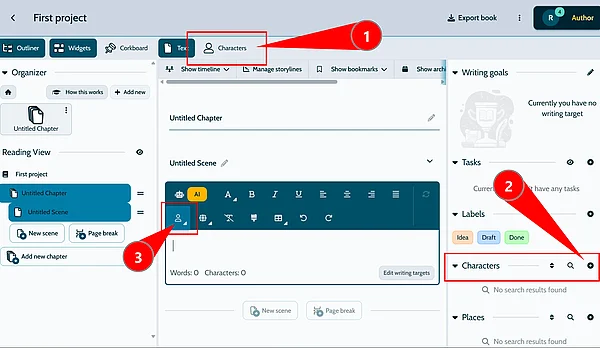
- Contains the main entry point. This redirects you to a dedicated character page, where you can manage existing characters or create new ones
- In the widget panel, you can quickly create a new character. This serves as a shortcut if you're in the middle of your text
- You can even use the character module within the editor to create a new character entry