
Why do I need the timeline?
As your book grows, it becomes increasingly complicated to maintain an overview of your existing texts. With multiple characters, places, and even character moods, it’s nearly impossible to keep everything straight in your mind. The timeline module on MyStory.today helps you stay organized by giving you a clear overview and even tracking the moods of your characters. This is extremely important for making your book project professional, relatable, and ensuring your characters remain three-dimensional.
How to add a scene to the timeline
To make a scene appear in the timeline, set a date for it. This can be done directly in the scene header or while editing a scene using the "Timeline" tab. After setting the time and pressing Save, the entry appears immediately in the timeline.
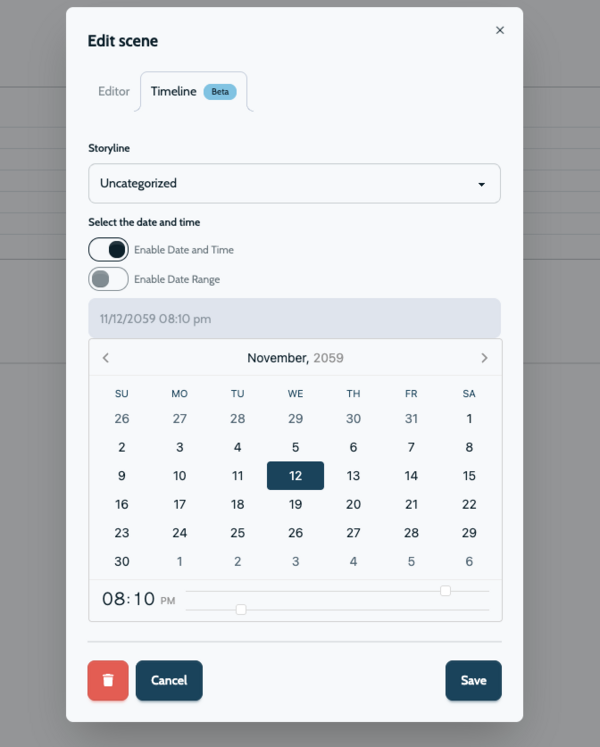
To jump faster into the future, press the month and year buttons at the top of the calendar to select a month. If you click on the year again in the calendar header, you will be taken to the yearly view. This allows you to quickly navigate into the distant future or the past.
You can even give your scene a duration; this is useful when something is happening in another scene, allowing you to build complex story structures without losing sight of the overall picture. Enable the "Select date range" toggle and then click once to set the start and end dates. The scene will be stretched across this time period in the timeline.
Why storylines help you to organize your timeline
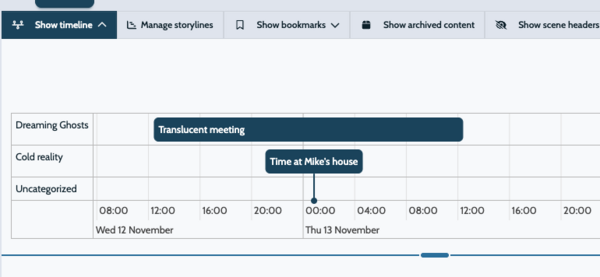
When your book becomes more complex, or if you like to keep things organized, you can create multiple storylines. A storyline is a thread in your book that follows a group of characters or the main character’s quest. You can define multiple storylines and assign scenes to each one. This will be reflected in the timeline, where each scene is linked to its corresponding storyline.
Character moods
Why do I need to track character moods?
Every character in your book has a personality, which is one of the most important aspects of your writing project. You have characters who are more positive and happy, as well as those who are grumpy and negative. This brings a book to life. In general, characters have a more positive or negative tone, which is critical for successful story development.
The timeline allows you to keep track of this development. Based on your story flow, you can observe how a character behaves over time. When a character has a more negative tone, it should remain consistent. Of course, you can develop the character gradually, but you should avoid jumping from a negative tone in the first scene to a very positive tone in the second scene and then back to a negative tone in the third. This makes the character seem inconsistent and difficult for readers to understand or relate to.
The arrow indicators of an individual character in the timeline show their overall tone. Two red arrows indicate a very negative mood, while one red arrow means partly negative. An orange icon represents a more neutral position, and green arrows indicate a positive mood. This allows you to track every single character in your scene over time. It gives you a lot of control over your story development and makes mood progression very easy to follow. With this, you have complete control over your writing project.
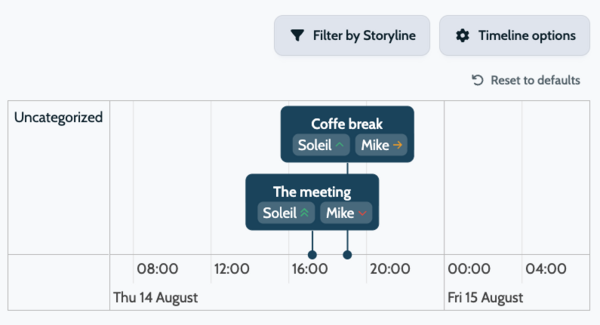
With the MyStory.today timeline, you avoid these issues and can focus on building strong, reliable character development. You can view all the character moods for each scene at any time directly in the timeline. Combine this with AI Character Moods to create a rock-solid setup without wasting days on preparation.