
MyStory.today versions 1.26 and 1.27 bring a new light mode for comfortable writing in any lighting, precise font size control measured in points, smarter text deletion warnings, and more reliable synchronization across your devices.
Why Light Mode Helps You Write Comfortably in Any Environment
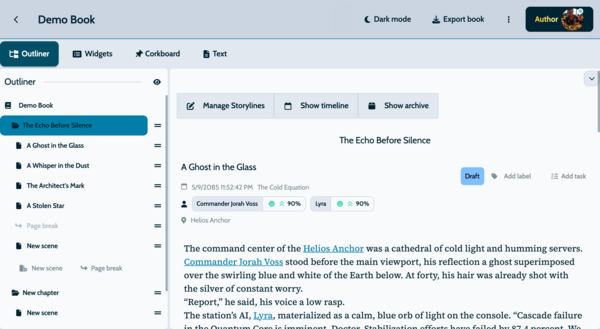
When writing books, new ideas can come at any time because they are not limited to a typical workday. You might do most of your writing during the day on your laptop, but in the evening, you could get a sudden idea while lying in bed and want to quickly add it on your mobile phone. These are two completely different situations where you work on your book, and MyStory.today supports both. During the day, when it is bright outside, light mode can be much less straining on your eyes because black text on a light background offers higher contrast and better focus.
At night, working in the dark means your screen will not act like a giant flashlight and light up the entire room. Especially in the evening, you will also experience less blue light, which is ideal when jotting down a quick idea from your bed.
If you are a night owl and want to use light mode at night to stay awake and focused, you can switch at any time. MyStory.today adapts to your writing habits, providing the flexibility you need with this new update.
How Light Mode Switching Works
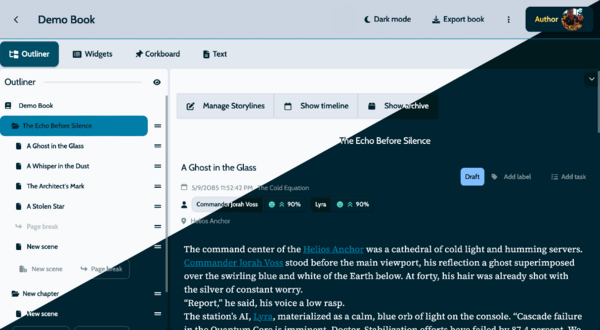
Switching is straightforward. One tap in settings toggles between light and dark, and MyStory remembers your choice. The entire interface transforms — buttons, menus, writing area, everything. Your text formatting stays exactly as it should in either mode.
We did not simply invert the colors. Every shade was chosen to reduce glare while keeping text easy to read. Character moods, timeline colors, and status indicators keep their meaning across both themes.
Unified Theme System
Before this update, some parts of the app used light theme while others stayed dark, which looked inconsistent. Version 1.26 unifies everything under one setting. A single toggle changes the entire application, and new users start with the clean light mode by default. Dark mode remains available for those who prefer it.
Font Size Section
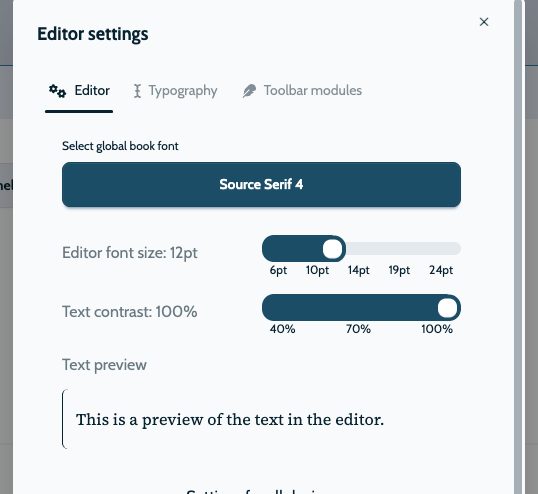
The previous small, medium, and large options limited many writers. Version 1.27 replaces them with a point-based scale from 8pt to 72pt, with a slider and real-time preview so you can find your ideal size. Your preference is saved and restored across sessions.
This is especially useful for writers with specific visual needs, or anyone who wants to optimize text size for different devices - larger on a phone, smaller on a desktop monitor.
Update to the latest version to try light mode and the improved editor controls. Adjust your font size, pick your theme, and write with the confidence that your work is protected across all your devices.