
MyStory.today helps you write your novel or short story, but exporting a book is not the end. With the new teleprompter mode, you have the possibility to do professional audio recordings in studios for your audiobook, live presentations, video sessions, or podcasts. All based on your writings in one single app. No extra subscription needed.
Your profile page got a facelift, making it easier to manage the account settings in one single window.
In addition, the writing goals got an update and the stats are now resettable. This helps when you missed a few days of writing and want to get back on track with your word target.
Some smaller bugs were also fixed, so this update brings a lot of new features and quality to your devices.
Teleprompter Mode: Present and Read Professionally
The new teleprompter mode transforms your written work into polished, scrollable readings. Whether you are recording audiobooks in your studio, presenting at conferences, or creating video content for your audience, this tool gives you a seamless reading experience without ever leaving your writing environment.
Teleprompter Features
Choose what you want to read. The teleprompter integrates with your outliner. Select the chapters or scenes you want to present, and the teleprompter view displays them in sequence. No copying and pasting into a separate app.
Mirror text for your setup. Physical teleprompters display text through a glass reflection in front of the camera. The horizontal mirror option flips your text so it reads correctly through the glass. One tap to activate.
Adjust to your equipment. Every teleprompter setup is different. Adjust the text width to fit your particular screen without awkward margins. The responsive design adapts to whatever device or rig you use.
Read with confidence. Dark mode boosts contrast under bright studio lighting. Adjust text size to match your reading distance. The screen-always-on feature on tablets and smartphones prevents unwanted sleep mode during long recordings.
Control your pace. Navigate your text at your own speed. MyStory supports both keyboard controllers and Bluetooth adapters, so you can start slowly for dramatic effect and pick up the pace during lighter passages. The control stays in your hands throughout the recording.
Redesigned Profile Settings
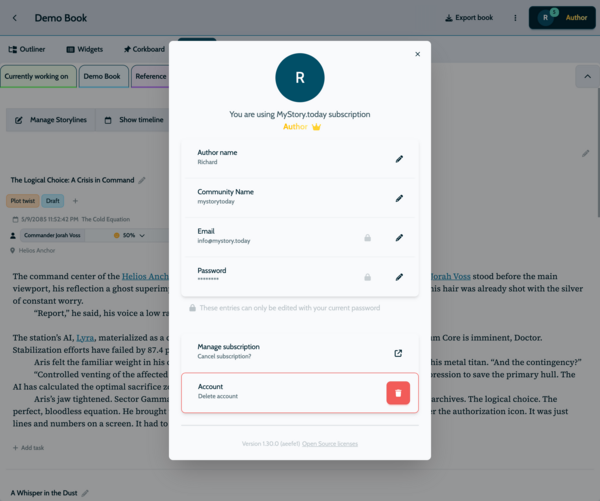
Your profile settings got a full rework. Options are grouped more logically, making it easier to find and adjust your preferences. The interface is cleaner and more intuitive on all devices.
Update your author name. You now have full control over how your name appears throughout the app and in shared content. Change it to your real name or a pen name directly in profile settings.
Reset Your Writing Stats
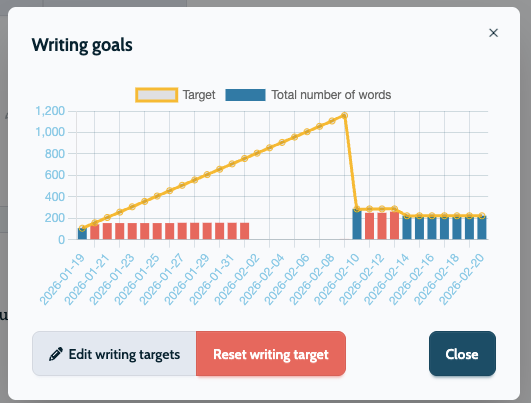
Life happens. You take a break from writing for a few weeks, and suddenly the statistics show you need hundreds of words per day to catch up. The new reset option clears your accumulated writing metrics and starts tracking from today.
This is especially useful for writers who work in cycles or seasons. Finish a project, take a break, and reset when inspiration returns. Your numbers stay relevant to your current phase instead of dragging in past data from months ago.
Update to the latest version to try teleprompter mode, the redesigned profile settings, and the writing stats reset. Whether you are preparing a live reading or just want a cleaner settings experience, this update has you covered.