
“Creativity is messy” is what Elizabeth Gilbert said once. Especially when you're in a writing flow you don't want to lose the idea or the direction you have in mind. Quickly create a new scene, add another new draft chapter and write it down before it gets lost. While a responsive online writing app is essential for capturing ideas on the fly, managing a growing novel requires more than just speed. With this update, we introduce a new standard of structural control: The Organizer.
From Reading Panel to Organizer: Mastering Complex Story Structures
The Reading View was one of the first features at MyStory.today back in 2018. It was the heart of how you organize your novel, allowing you to create chapters and scenes for your project, change the order for the book export and manage the reading flow in general.
This works fine for planning smaller projects but as things are growing and your novel gets bigger it's getting complex, even with multiple storylines and non-linear timelines. This makes a book more interesting but it's hard to maintain for you as an author. To solve this issue and make your work easier, MyStory.today introduced the biggest change since the release to the reading view: The new Organizer.
A structure that fits your project
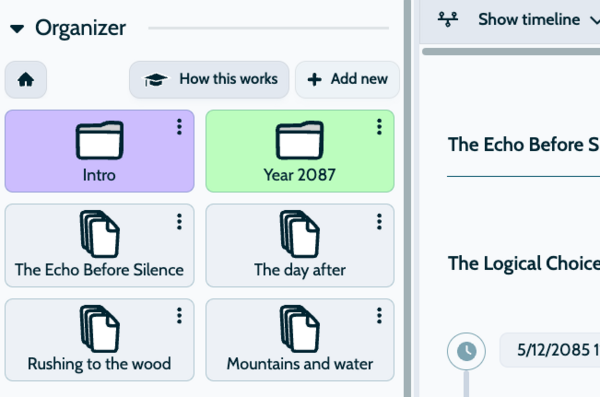
Organization is individual. Since every book is unique and workflows vary, MyStory.today gives you total freedom in your novel planning, allowing you to structure your project exactly how you want. So you decide how you organize your story online or you can skip the organization part and just start writing. This is one of the core strengths of MyStory.today: Providing the freedom your creativity needs.
In this version you can now create folders and move chapters into them. Like all our tools, this works seamlessly across all platforms, so you get a consistent experience across our online writing app, whether you are on desktop or mobile. You can even create sub-folders to nest your chapters as deeply as your novel requires.
Examples of folder structure
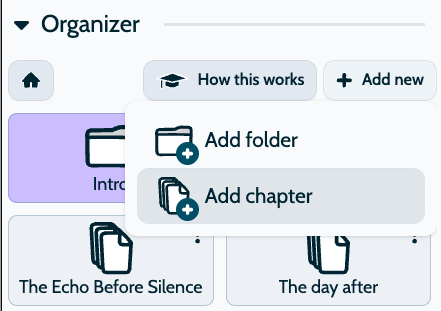
By default you'll have a flat structure of your book, so all the chapters are in the root folder of your project. You can set up a folder structure based on your novel type. For example, you can create the Three-Act Story structure
- Folder Act I: Setup
- Hook
- Inciting Incident
- Plot Point 1
- Folder Act II: Confrontation
- Rising Action
- Midpoint
- Plot Point 2
- Folder Act III: Resolution
- Climax
- New Status Quo
With this approach, you have a powerful tool to organize your novel on a big picture level and make it very easy to maintain your story structure. You can create folders and chapters directly in the outliner and organize them immediately.
A personal guide to the new Organizer
Together with the Organizer, the first step-by-step video tutorial is now available directly in the app and on the website. MyStory.today believes in authentic creativity, which is why no AI was used to create this tutorial. This gives the app more personality, as the videos are spoken by the founder, Richard.
In addition to the introduction, you'll find detailed guides in the app to see exactly how the Organizer works, making it easy for you to get started with your novel planning.
All videos are hosted on our own platform, so you can enjoy an ad-free and privacy-focused experience. You can find the video in the app under “How it works” as well. Want to dive deeper? Check out all our tool capabilities on the Outliner Features Page.